
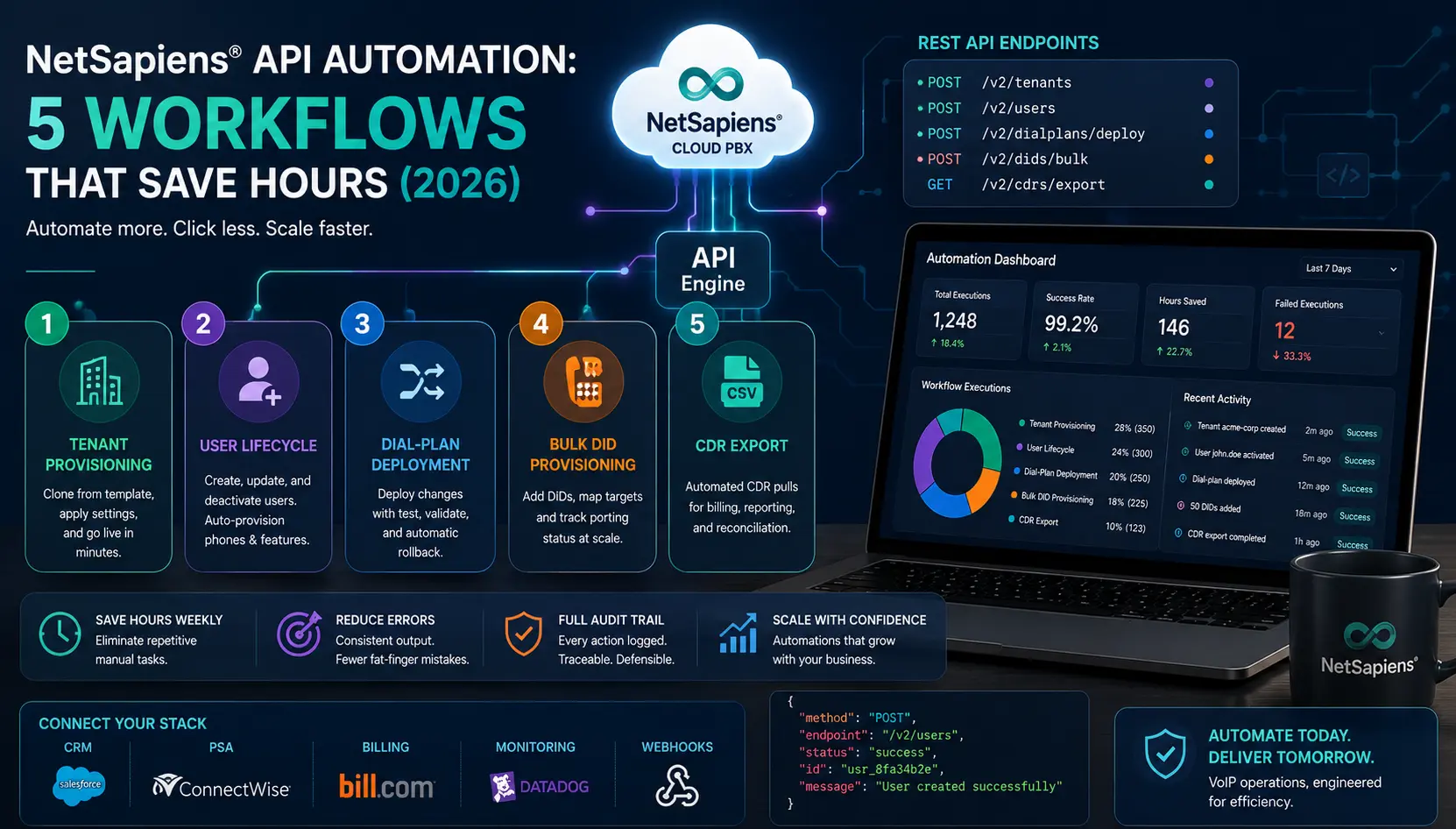
API automation is what separates a reseller team that spends 80% of its hours on platform clicks from one that spends 80% on customer-facing engineering. NetSapiens® exposes a substantial API surface — REST and SOAP — that covers the operational actions a multi-tenant operator touches every day. This guide covers the five workflows where automation pays off most, plus the patterns and pitfalls we see when we build reseller automation in production.
For a real-world example of API automation on NetSapiens® at scale, see our API Automation Dashboard for SkySwitch® case study — same platform, similar workflows, applied to a high-volume reseller environment.
Why automate
Manual platform clicks scale linearly with tenant count. Three sources of pain compound:
- Repetitive operations. Adding a user, provisioning a phone, updating a dial-plan rule — each takes minutes, repeated across many tenants per week.
- Error propagation. Manual clicks introduce typos, off-by-one extension assignments, and missed steps. Each becomes a downstream support ticket.
- No audit trail. Manual changes leave incomplete records. Reconciling “who changed what when” across a year of operations is expensive without a programmatic log.
Automation addresses all three. Even modest automation — one workflow done well — pays back its build cost within weeks for a reseller running 10+ tenants.
NetSapiens® API surface
NetSapiens® exposes both REST and SOAP interfaces. Most modern reseller automation starts with REST; SOAP remains relevant for older integrations and some platform-internal actions. Authentication is credential-based, with scope depending on the credential type and the deployment.
For aggregator deployments — most commonly SkySwitch® (a BCM One company) — there’s typically an aggregator-layer API that wraps NetSapiens®, plus the underlying NetSapiens® API itself. Decide upfront which layer your automation targets. The aggregator API is usually easier and rate-limit-friendlier; the NetSapiens® API is more direct but requires more careful operation.
The five workflows
1. Tenant provisioning
The first workflow most resellers automate. New customers turn into new tenants on a cadence — usually weekly to monthly — and each new-tenant build has the same structure: clone from a template, override customer-specific fields, attach billing, provision the first administrator user.
Done manually: 30-60 minutes per tenant, with reliability depending on the operator’s attention.
Done via API: under 10 minutes, with consistent configuration and full logging.
The HowTo at the top of this post walks through the exact steps. The hard part is not the API call; it’s deciding which template you clone from and which fields you override per customer. Keep that mapping in your operational system (CRM or PSA), not hard-coded in the automation.
2. User add/remove with auto-provisioning binding
Every new employee at every customer means a new user provisioning. Manually, this is several steps in sequence: create user, set features, generate SIP credentials, bind to a device profile, send credentials to the device.
Automated: a single API call (or short sequence) creates the user, configures features from a template, and stages the device profile. The phone — auto-provisioning via DHCP option 66 or vendor redirection — picks up its configuration on next boot.
Pair this with user-removal automation: deactivate user, retain voicemail box for a retention window, release the device profile, free the extension number. Cleanly handled removals avoid the “ghost user” problem that accumulates over years.
The NetSapiens® Provisioning Guide covers the manual flow that the automation replicates.
3. Dial-plan change deployment with rollback
Dial-plan changes are the highest-risk automation target. A misconfigured match rule can break routing for an entire tenant. So the automation here is more about safety than speed.
The pattern we use:
- Capture the current dial-plan state via API before any change. This is the rollback artefact.
- Apply the change via API.
- Run a tester sequence — programmatic dial-plan tests for a curated set of dialed strings that exercise the most common call types for the tenant.
- If tests pass, commit. If any test fails, automatically restore from the captured state.
The capture-apply-test-rollback loop turns dial-plan deployment into a deterministic, reversible operation. The dial-plan cheat sheet covers the rule patterns the automation deploys.
4. Bulk DID provisioning and porting status checks
DIDs are the lifeblood of telephony, and at scale they’re a constant operational activity: new DIDs to provision, ported numbers to track, DID-to-target mappings to update.
The automations that pay off here:
- Bulk DID provisioning. Add 50 new DIDs to a tenant in one operation, with their initial target mappings. The single biggest savings is in the verification — programmatically confirming each DID is bound to the correct target, rather than spot-checking manually.
- Porting status checks. For port-in orders submitted to the losing carrier, automated daily polling of porting-status APIs catches problems faster than waiting for the carrier’s email update. The LNP porting rejection guide covers the rejection scenarios this automation surfaces.
- DID-to-target reassignment in bulk. A customer reorganises departments; 40 DIDs need to move from queue A to queue B. Programmatic reassignment with logged change records.
5. CDR export for billing reconciliation
CDRs (Call Detail Records) feed billing, reporting, and analytics. Automated daily export of CDRs to your billing reconciliation system catches missing records faster than waiting for the monthly invoice cycle.
The pattern:
- Pull CDRs for the prior day via API on a nightly schedule.
- Reconcile against the Bill Center rating queue — every CDR should rate; un-rated CDRs are a configuration bug.
- Surface anomalies — sudden drops in CDR volume per tenant, high-cost international destinations from tenants that don’t typically have them, after-hours call surges.
The CDR billing reconciliation guide walks through the manual reconciliation flow this automation replaces.
Common pitfalls
The mistakes that recur when teams write API automation against telephony platforms:
- Treating success as guaranteed. A 200 response from a POST is not authoritative evidence the platform completed the operation. Always GET the resulting state to confirm.
- No idempotency. Re-running an automation that’s not idempotent creates duplicates: two tenants instead of one, two voicemail boxes, two device profiles. Bake idempotency into the request payload (deterministic identifiers, conditional create-or-update logic).
- No partial-failure handling. Bulk operations almost always have some per-item failure. Log per-item outcomes; do not abort the whole batch on the first failure; support resuming from a known state.
- No rate-limit handling. A burst of API calls hits the rate limit, gets 429s, and the automation either crashes or retries blindly. Build in pacing and exponential backoff from day one.
- Hard-coded credentials in source control. Treat API credentials like production database credentials — in a secrets manager, never in code, rotated regularly.
- No audit logging. When a customer asks “who made this change and when,” the audit log is the only authoritative answer. Log every API call your automation makes, with the triggering context and the response.
- Untested live-call changes. Deploying a dial-plan change automation that hasn’t been tested against the production-equivalent dial plan is how multi-tenant outages happen. Test in a non-production tenant first; never assume.
What we run for resellers
API automation for NetSapiens® resellers is part of our engineering capability — we’ve built provisioning workflows, dial-plan deployment pipelines, and reporting integrations on NetSapiens® for several reseller environments. The API Automation Dashboard for SkySwitch® case study is one example: a self-service dashboard that gave NetSapiens® resellers on SkySwitch® self-service dial-plan changes and CID campaign control, cutting change-request lead times by 80%.
For the broader operational picture, the NetSapiens® support and operations team handles steady-state operations across the cluster, and our white-label Tier 1–4 NetSapiens® support ties into the same API automation infrastructure when reseller teams need the support layer to be programmatic.
Independence and disclosure
VoIP Support Pro is an independent provider of support and engineering services for the NetSapiens® platform. We are not affiliated with, endorsed by, or sponsored by NetSapiens® or Crexendo, Inc. NetSapiens® is a registered trademark of Crexendo, Inc. API surface and rate-limit specifics in this guide reflect typical NetSapiens® deployments; vendor documentation and your platform operator’s current configuration remain canonical.