
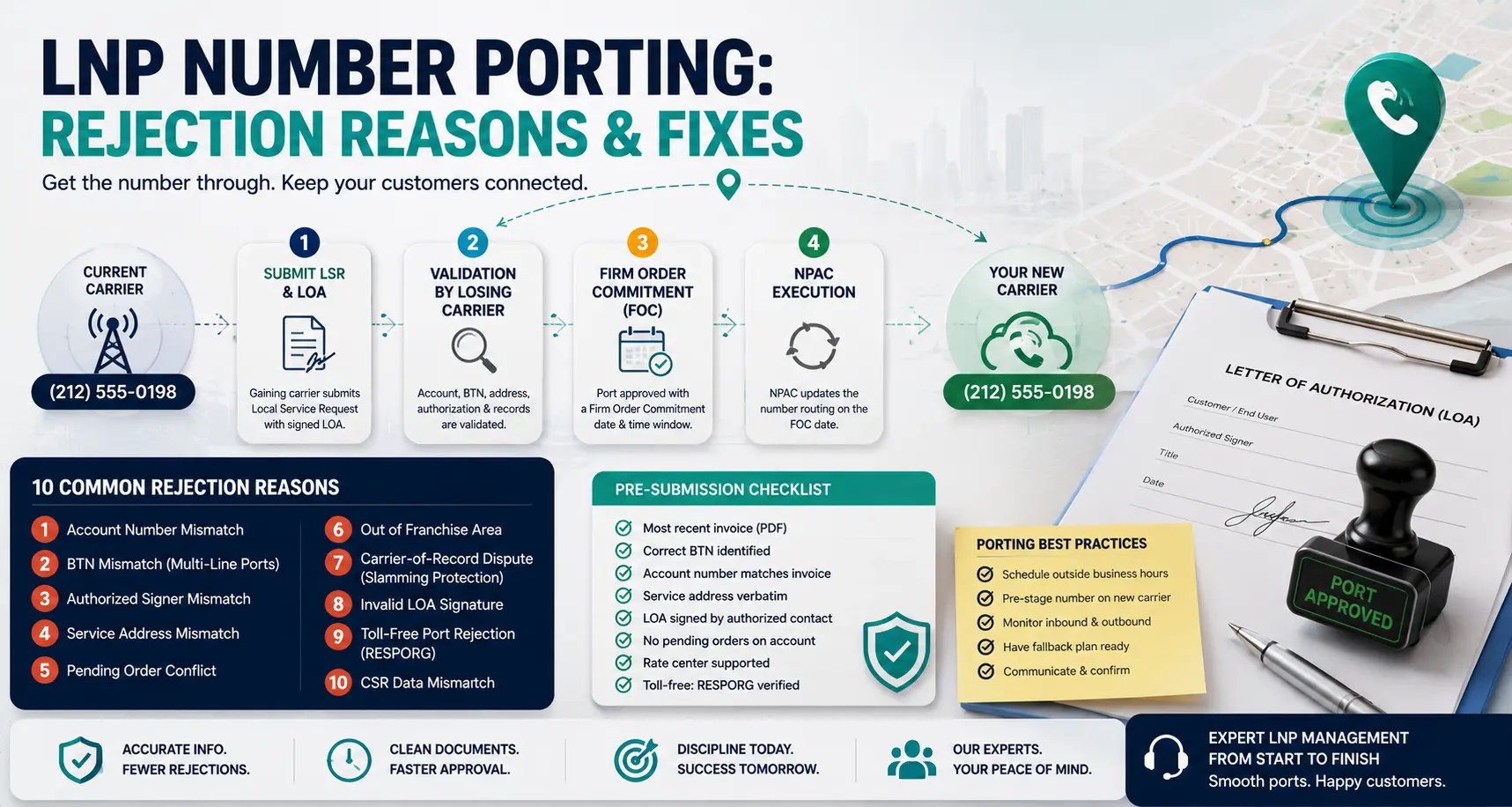
A botched port window can cost more than a botched migration. The customer’s number goes dark mid-business-day, every inbound call fails for hours, and “we’re transferring carriers” stops being an acceptable explanation around the 60-minute mark. The good news: about 90 % of port rejections fall into ten common patterns, all of them recoverable with the right documentation. This is the operational playbook — what each rejection actually means, why the losing carrier rejected it, and what to put on the resubmission that gets the port through.
How LNP actually works (the part most engineers skip)
LNP — Local Number Portability — is governed at the FCC and run operationally by NPAC (Number Portability Administration Center) and the Service Order Administration (SOA) systems each carrier connects to. The mechanics:
- Gaining carrier (you) submits a Local Service Request (LSR) with a signed Letter of Authorization (LOA) to the losing carrier.
- Losing carrier validates the LSR against their records: account number, billing telephone number (BTN), service address, end-user name.
- If validated, the losing carrier returns a Firm Order Commitment (FOC) with a date.
- On the FOC date, NPAC executes the porting transaction. Calls to the number now route through your network.
Every step has its own rejection codes. The rejection itself names the field that failed validation — but the underlying cause is almost always documentation mismatch with what the losing carrier has on file.
The 10 rejection patterns
1. Account number mismatch
Symptom: rejection cites “Invalid Account Number” or similar.
Cause: the LSR account number doesn’t match the losing carrier’s billing record. Customers often supply the account number from a recent invoice, but resellers and CLECs sometimes have a separate underlying carrier account number that differs.
Fix: pull the most recent telephone bill — the actual PDF — and use the account number printed there. If the customer is a reseller, you may need their underlying carrier’s account number; ask explicitly. Some losing carriers will accept the BTN as the account number for residential lines; never assume.
2. BTN mismatch on multi-line ports
Symptom: single-line ports succeed; multi-line ports reject with “BTN does not match.”
Cause: the Billing Telephone Number on a multi-line account is the single number all other lines roll up to for billing. The numbers being ported aren’t all the BTN; only one is. Multi-line ports must specify the BTN separately from the porting numbers.
Fix: ask the customer which number on their bill is the BTN. It’s usually the first line listed, but not always. Include it explicitly in the LSR under the BTN field, not the porting-numbers field.
3. Authorized signer mismatch
Symptom: rejection cites “End-user name mismatch” or “Not authorized to port.”
Cause: the LOA was signed by someone the losing carrier doesn’t recognize as authorized. For business accounts, this is usually because the signer’s title isn’t on the carrier’s authorization list.
Fix: ask the customer who is listed as authorized contact with the losing carrier. Re-sign the LOA with that person. If the original authorized contact has left the company, the customer needs to update the losing carrier’s authorization record first — often a separate paperwork process taking days.
4. Service address mismatch
Symptom: rejection cites “Address does not match.”
Cause: the LSR service address has even a small variation from what the losing carrier has on file — abbreviation differences, missing suite number, ZIP+4 absent.
Fix: copy the service address verbatim from the losing carrier’s invoice. “Street” vs “St”, “Suite 4B” vs “#4B”, “12345” vs “12345-6789” are all enough to reject.
5. Pending order conflict
Symptom: rejection cites “Conflicting order on account” or “Account has open work order.”
Cause: there’s another change order pending on the customer’s account at the losing carrier — a feature change, address change, equipment order, or even a previous unsuccessful port attempt.
Fix: ask the customer to call the losing carrier and confirm the pending order. Either wait for it to close or have the customer cancel it. Resubmit the LSR after the account shows no pending work.
6. Out of franchise area
Symptom: rejection cites “Number not portable to this rate center” or “Geographic restriction.”
Cause: LNP is restricted by rate center. A number cannot be ported to a carrier that doesn’t have a presence in that rate center.
Fix: confirm your underlying carrier covers the rate center. If they don’t, you either need a different underlying carrier, a different number, or to coordinate a rate-center exchange (rare and slow).
7. Carrier-of-record dispute (slamming protection)
Symptom: rejection cites a recent provisioning event on the account.
Cause: FCC slamming protection prevents rapid carrier changes. A port that happened within the last 30 days can block a new port attempt.
Fix: wait out the slamming-protection window or get the customer to file an explicit waiver with the losing carrier.
8. Invalid LOA signature
Symptom: rejection cites “LOA does not meet requirements.”
Cause: LOA is missing a required field, has a non-original signature (typed name instead of signature), or is from outside the carrier’s accepted format. Some carriers require their own LOA template.
Fix: pull the losing carrier’s LOA template (publicly available for most carriers). Use it verbatim. Get a wet or e-signature with date and printed name. Avoid scanned-and-edited LOAs — some carriers detect this and reject.
9. Toll-free port rejection
Symptom: rejection on a toll-free number — different rules apply.
Cause: toll-free numbers use RESPORG (Responsible Organization) records, not LNP. The port is to a different RESPORG entity, not just a different carrier. Toll-free ports go through SMS/800 or the dedicated toll-free aggregator system.
Fix: confirm with your toll-free aggregator (Bandwidth, Twilio, Genesys, INA) that the porting workflow is RESPORG-based. Pull the current RESPORG of record from SMS/800 lookup before submitting. The LOA must specifically authorize a RESPORG change.
10. CSR mismatch (Customer Service Record)
Symptom: rejection cites “CSR data does not match” — often without specifying which field.
Cause: the Customer Service Record is the losing carrier’s authoritative customer data. Even fields you didn’t include on the LSR can cause a rejection if they’re populated on the CSR with conflicting data.
Fix: request the CSR from the losing carrier before submitting (some carriers will provide on customer request, others won’t). When a CSR-mismatch rejection lands, ask the losing carrier specifically which field mismatched — it’s not always the obvious one. Once known, correct it on the LSR and resubmit.
The pre-submission checklist
For every port, before submitting the LSR:
- Most recent invoice on hand (PDF, not paraphrased).
- BTN identified and matches the invoice.
- Account number copied verbatim from the invoice.
- Service address verbatim, including suite/unit and ZIP+4 if shown.
- LOA signed by the authorized contact (verified with the losing carrier if any doubt).
- Customer confirmed no pending orders on the account.
- Rate center confirmed against the gaining-carrier’s footprint.
- If toll-free, RESPORG path documented.
That checklist alone catches roughly 80 % of first-submission rejections before they happen.
Port window operations
Once the FOC date is locked, the actual port window matters.
- Schedule outside business hours when possible. Most ports execute within a 4-hour window on the FOC date. Off-hours scheduling reduces customer impact if anything goes wrong.
- Pre-stage the number on the gaining-carrier side. Provisioning the number in NetSapiens® before the cutover means routing flips the moment NPAC propagates.
- Monitor inbound and outbound separately. A port can succeed for inbound but fail for outbound (or vice versa) if SBC routing isn’t fully aligned.
- Have a fallback announcement ready. If the port hangs, having a quick conditional-forwarding setup on the losing carrier’s number to a backup IVR keeps customers from hearing dead air.
When to escalate to platform-level migration support
If you’re managing more than 20 ports per month, port-rejection patterns become recognizable. Below that, every rejection is a new problem to chase. Our VoIP platform migration service handles end-to-end LNP coordination as part of larger NetSapiens® migrations — LOA preparation, FOC scheduling, carrier exception handling, port-day execution, and rollback planning. For ongoing day-2 porting operations after a migration is complete, white-label NetSapiens® helpdesk covers porting tickets at Tier 2/3 inside your PSA so port windows don’t pull your engineers off other work.
The discipline that makes ports boring
Boring ports are good ports. The teams that achieve them all do the same thing: they treat the CSR as the source of truth, write LSRs that match it exactly, and never assume what the losing carrier has on file. Once the discipline is in place, rejection rate drops below 10 %, FOC dates stick, and port windows become non-events. Skip the discipline, and you’re explaining a botched cutover at 11 AM on a Wednesday.