
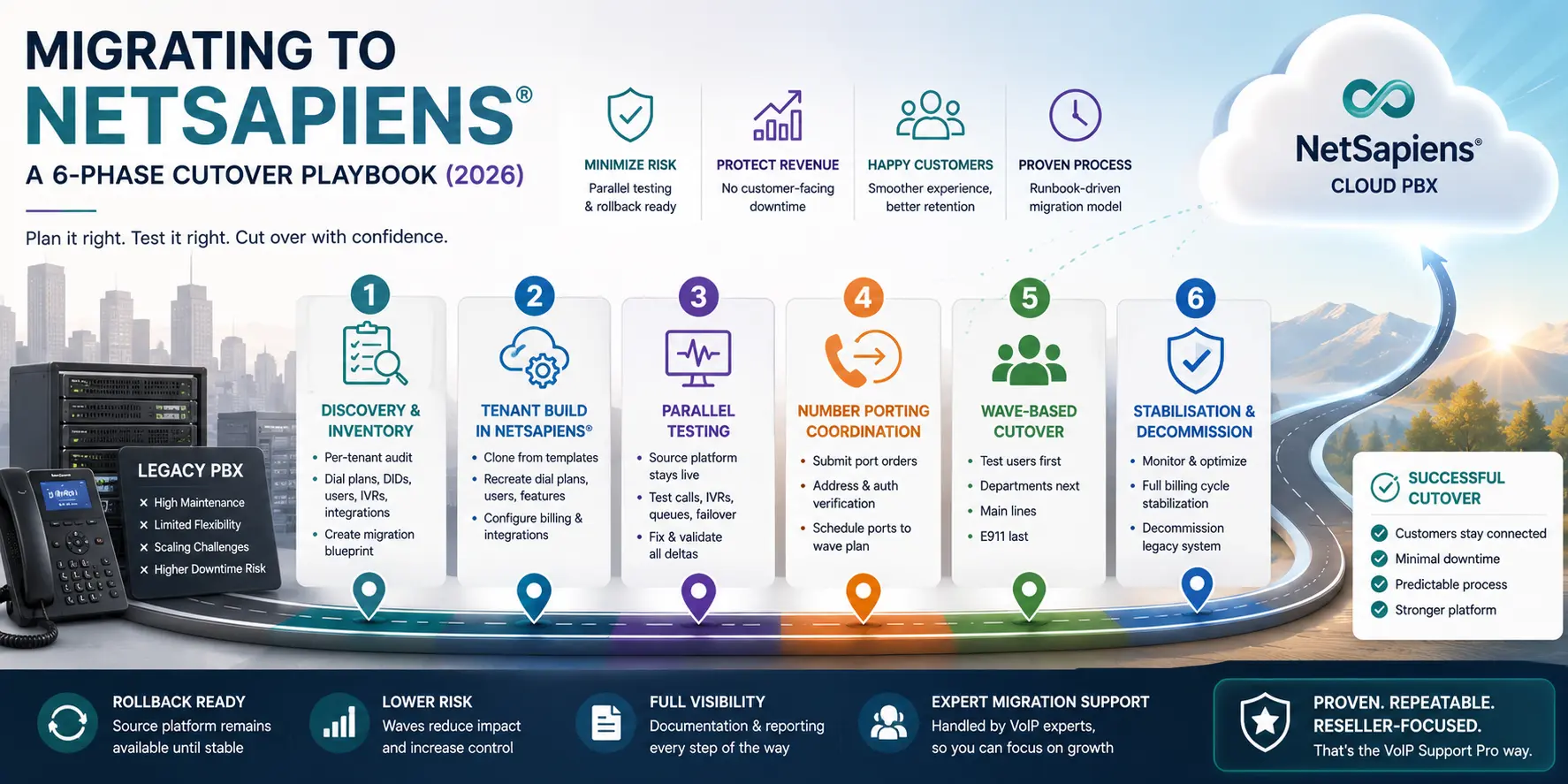
A reseller migration to NetSapiens® is not a flip of a switch. It is a structured project with sequential phases, each gated on the prior one. Done well, it lands without customer-visible downtime and without the support-ticket spike that usually follows a platform change. This playbook is the version we run for resellers moving from FreePBX, Bicom Systems, or legacy on-prem PBX deployments onto NetSapiens® — with rollback paths at every phase.
If you are still deciding whether to migrate at all, the NetSapiens® vs FreePBX comparison guide is the companion piece. This one assumes the decision is made and you are scoping the project.
How long does this actually take?
For a single small tenant, a complete cutover can wrap in one coordinated window plus a stabilisation period. For a reseller moving 10+ tenants, the project typically runs 4 to 12 weeks — driven less by build time and more by porting carrier turnaround and your willingness to cut in waves rather than big-bang. The 6-phase structure scales: same phases, more time per phase as the tenant count grows.
The single highest predictor of a clean migration: not rushing phase 3 (parallel testing). That is the gate where errors are cheap. Everything after it is expensive.
Phase 1 — Discovery and per-tenant inventory
The inventory is the contract for the migration. Anything not captured here is what surprises you in Phase 5.
For each tenant on the source platform, document:
- Dial plans. Every match rule, every translation, every route — outbound, inbound, internal, emergency. Note any time-of-day overlays and holiday exceptions.
- IVRs and queues. Menu structure, prompt audio, queue routing strategy, overflow rules, wait music.
- Users, extensions, voicemail boxes. Per-user feature configuration (find-me-follow-me, call recording, voicemail-to-email, presence rules).
- DIDs and DID-to-target mappings. Which numbers exist, which carrier owns each, which internal target they point at.
- Integrations. CRM dial-out, recording archive destinations, billing platform connections, PSA-side ticket-routing webhooks.
- Billing configuration per tenant. Rate plans, products, recurring charges, prorated cutover history.
- E911 setup. Caller location addresses, dynamic location handling for soft clients, the carrier route for 911 traffic.
If your source platform is FreePBX, much of this lives in the extensions.conf, GUI module configs, and a database. If it is Bicom Systems, the per-tenant views in the management interface are your starting point. Either way, plan for inventory to take longer than you think — incomplete inventory is the most common cause of migration regressions later.
Phase 2 — Tenant build in NetSapiens®
With inventory complete, build each tenant inside NetSapiens®:
- Clone from a template. Establish one or two “reference tenants” early. Every new tenant clones from a template, then gets overlaid with the customer-specific configuration from Phase 1.
- Replicate dial plans by hand. FreePBX dialplan logic does not auto-import; Bicom routing does not auto-export. The translation is engineering judgement — match rule by match rule. Build them in the NetSapiens® dial-plan editor, in precedence order, and double-check the order against the source platform’s behaviour.
- Provision users and devices. Use the auto-provisioning files NetSapiens® generates rather than hand-configuring phones. Phones can be reconfigured to point at NetSapiens® via DHCP option 66 or manual config; plan the device-reconfig window.
- Wire integrations. Set up the CRM dial-out connector, the recording archive destination, the PSA webhooks. If the integration uses an API, test the auth flow before Phase 3, not during it.
Build in batches. Trying to build all tenants in parallel introduces coordination overhead that slows everything. Sequential batches are faster overall.
Phase 3 — Parallel testing (the gate)
This is the most important phase and the one that resellers under deadline pressure are most tempted to skip. Do not skip it.
With the source platform still live, route test calls to the new NetSapiens® tenant from test DIDs (or temporary inbound numbers, or internal test phones). For each tenant:
- Inbound DID test cases. Each DID into the expected target — user, queue, IVR — with audio in both directions.
- Outbound test cases. NANPA, international, toll-free, 911 (use the test number your platform provides for 911 verification, never an actual 911 call).
- IVR walkthrough. Every menu branch, every voicemail leave-and-listen, every overflow path.
- Failure-mode test cases. Trunk down, codec mismatch (force G.722 vs G.711), NAT keepalive interval too long, presence subscription overflow.
- Integration smoke test. CRM dial-out from the live softphone, recording landing in the expected archive, billing entry generated in Bill Center.
Document every delta between the source platform’s behaviour and the NetSapiens® build. Fix the deltas before Phase 4. A delta surfacing in Phase 5 is expensive; a delta surfacing in Phase 6 is reputational.
Phase 4 — Number porting coordination
Number porting is the only phase with a hard external dependency (the losing carrier). Plan around their timing, not yours.
- Submit port-in requests early. Most carriers ask for 5-10 business days notice for residential numbers, longer for toll-free or international. Submit the orders before Phase 5 wave windows so the port lands on the wave day, not before.
- Match the porting authorization. Address mismatches and wrong losing-carrier identifications are the highest-frequency rejection reasons. The LNP porting rejection guide covers the standard fixes.
- Sequence the ports with the cutover waves. Do not port all numbers at once. Coordinate so each wave’s DIDs port on the wave day, with the prior wave already stable.
- Hold E911 emergency numbers for the final wave. Mistakes here have legal exposure; they should land last, when every other piece is already proven.
Phase 5 — Wave-based cutover
Cut DIDs over to NetSapiens® in waves, never all at once. The wave structure we run:
- Wave 1 — test users only. A small group of internal-facing users in each tenant. Confirm production routing matches Phase 3 testing. Lowest blast radius.
- Wave 2 — production users by department. One department per session. After each session, monitor MOS, ticket volume, and helpdesk traffic for 24 hours before the next.
- Wave 3 — main lines and shared-line groups. Inbound DIDs that route to multiple users or queues.
- Wave 4 — E911 and emergency lines. Last. Confirm caller location is registered correctly with the new carrier before the wave window closes.
Between waves, keep the source platform reachable. If a wave surfaces an unforeseen issue, you can fall back to the source platform for that tenant within minutes. The source-platform configuration is not deleted; it is held in cold-standby.
Phase 6 — Stabilisation and decommission
Each tenant holds in parallel-reachable mode for at least one full billing cycle (typically 30 days). During stabilisation:
- Monitor MOS per route, ticket volume per tenant, and any customer-side complaints. Issue patterns surface inside the first 2 weeks. If none surface, the tenant is stable.
- Reconcile billing. Compare the first NetSapiens®-generated invoice against the source-platform’s historical billing for the same period. Tenant-by-tenant. Expect minor variances; investigate large ones.
- Hand off operationally. Move the tenant’s ongoing operational responsibility from the migration team to the steady-state support team. Document any tenant-specific quirks in the runbook.
- Decommission the source-platform tenant. Only after the stabilisation window has closed cleanly. Archive the source-platform configuration before deletion — keep the archive for at least the contractual rollback window.
What we run for resellers
The 6-phase model above is the structure we run on migration engagements through our VoIP migrations service — for resellers and MSPs whose tenant count and customer-facing exposure make a self-run migration too risky. For the broader operational support that continues after migration, our NetSapiens® support and operations team holds tenants steady through Tier 1-4.
Independence and disclosure
VoIP Support Pro is an independent provider of support and migration services for the NetSapiens® platform. We are not affiliated with, endorsed by, or sponsored by NetSapiens® or Crexendo, Inc. NetSapiens® is a registered trademark of Crexendo, Inc. The migration playbook above reflects our operational practice as a support partner; vendor-specific tooling and current carrier porting timeframes remain canonical from the platform owners.