
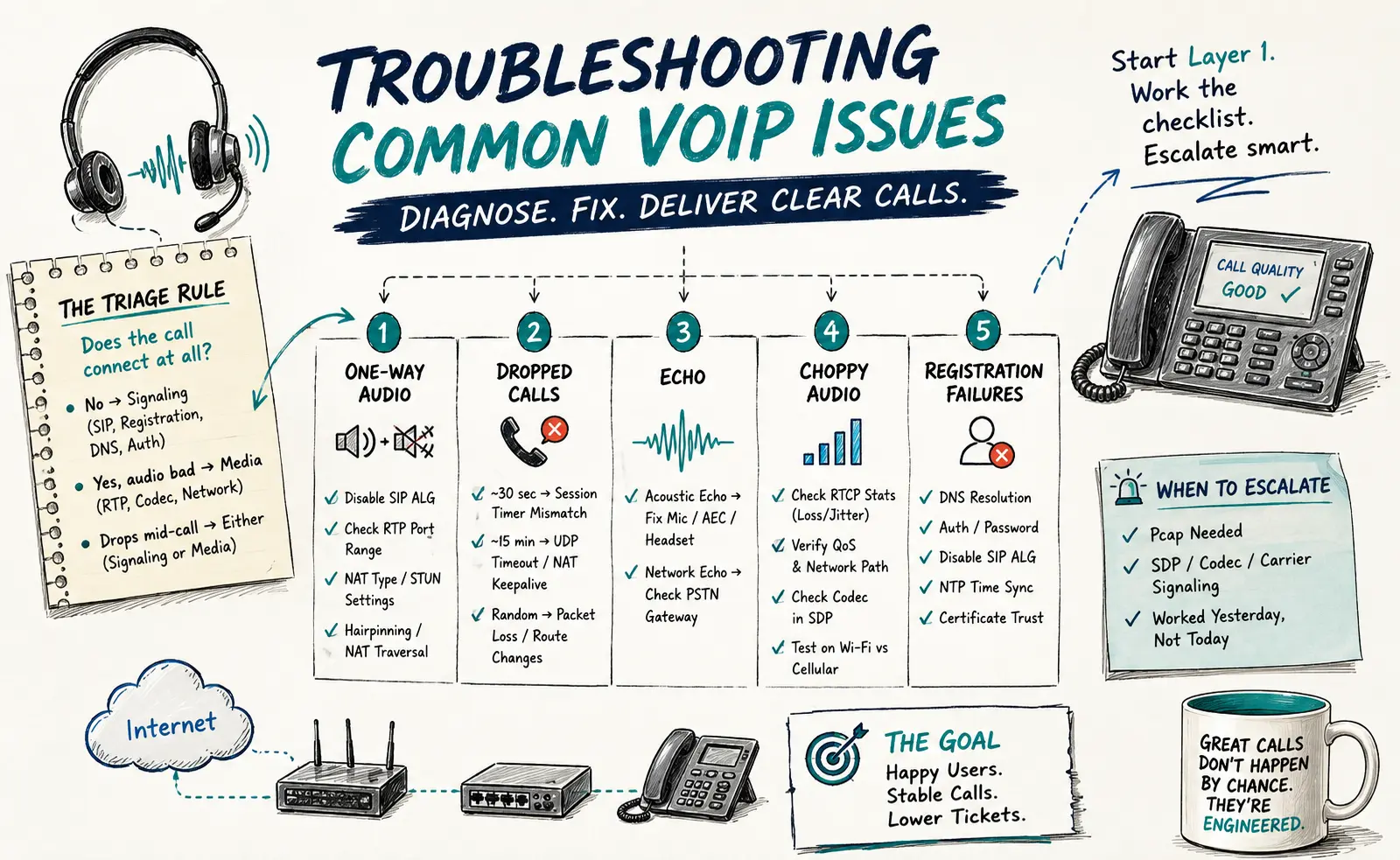
A NetSapiens® platform that’s been quiet for six months is the platform that’s about to surprise you. The good news: 90 % of VoIP issues fall into five categories, and each category has a tight diagnostic path. The bad news: the wrong order of checks can burn an hour on the wrong layer.
This is the playbook helpdesk engineers run — what to check, what to rule out, and when to stop guessing and pull a pcap.
The triage rule: layer first, layer always
Before you touch anything, answer one question: does the call connect at all?
- No, the call fails immediately → signaling problem (SIP, registration, DNS, auth).
- Yes, it connects but audio is bad → media problem (RTP, codec, network).
- Yes, it connects and audio is clean but drops mid-call → could be either signaling (re-INVITE, session timer) or media (NAT keepalive, packet loss).
That branch eliminates half the wrong paths.
One-way audio
Symptoms: the caller can hear the callee, or vice versa, but not both.
Almost always a NAT or firewall problem. Specifically, RTP media is reaching one side but not the other.
Check in this order:
- SIP ALG. Disable it on the firewall. If it was on, restart phones and retest. This fixes the issue on first-try about 60 % of the time.
- RTP port range. NetSapiens® uses a defined RTP port range — confirm the firewall isn’t blocking those UDP ports outbound or inbound. Common range: 10000–20000 UDP.
- NAT type. Symmetric NAT breaks SIP/RTP without help. If you can’t change NAT type, the platform’s far-end NAT traversal (rport, ICE, or media relay) must be enabled.
- STUN/TURN. For softphones on hostile networks (hotels, coffee shops), STUN should be set on the device. NetSapiens® platforms typically provide a STUN server; verify the client is using it.
- Hairpinning. If two phones on the same internal network call each other and one-way audio occurs, the firewall isn’t hairpinning RTP correctly. Either fix it at the firewall or route on-net calls through the platform’s media relay.
Dropped calls
Symptoms: calls disconnect at ~30 seconds, ~15 minutes, or some other consistent interval.
The interval is the diagnostic. Consistency = configuration. Inconsistency = network.
- Drops at ~30 seconds: SIP session timer mismatch. The platform sends a re-INVITE to keep the call alive; if the endpoint or firewall doesn’t respond, the call ends. Check session timer settings on both endpoint and platform — they should be in the 1800-second range with both sides agreeing on who refreshes.
- Drops at ~15 minutes: firewall UDP session timeout. NAT keepalive isn’t holding the pinhole open. Increase the keepalive frequency in the phone config (every 30 seconds is reasonable).
- Drops randomly: packet loss, route changes, or a flapping ISP. Pull RTCP statistics from the platform — look for sustained packet loss above 2 % or jitter spikes above 60 ms. If both look clean, it’s signaling.
Echo
Symptoms: caller hears their own voice delayed by 50–500 ms.
Two distinct types — diagnose which first.
Acoustic echo (most common):
- Speakerphone with a near microphone — increase distance or enable AEC on the handset.
- Cheap headset without proper isolation — replace with one that has acoustic echo cancellation.
- A specific handset model in a specific environment — firmware update on the phone often resolves it.
Network echo (rare but real):
- Caused by impedance mismatch when calls hit the PSTN through a poorly configured gateway.
- Symptoms: only happens on external calls, never on on-net.
- Fix is upstream of the platform — usually a carrier-side echo canceller setting.
If echo only happens for one user, suspect their hardware first. If it happens for everyone calling a specific number, suspect the route.
Choppy / robotic audio
Symptoms: audio cuts in and out, words clip, or speech sounds digitized.
This is almost always packet loss or jitter — the codec is interpolating because real audio packets aren’t arriving in time.
- Pull RTCP from the call. Look for packet loss > 1 % or jitter > 30 ms. NetSapiens® exposes this in the call detail records.
- Trace the path. If loss is occurring on the WAN, it’s a network problem — likely QoS isn’t honoring voice traffic. See the QoS guide for end-to-end DSCP markings.
- Codec negotiation. If both endpoints can do G.722 but the call ended up on G.729 over a constrained WAN, you’ll get choppy audio. Check SDP for the negotiated codec — if it’s wrong, fix the dial plan codec preference.
- Buffer underrun on softphones. Mobile softphones on cellular suffer from this. Switch to Wi-Fi to confirm; if the issue clears, it’s a mobile carrier problem.
Registration failures
Symptoms: phone shows “Not Registered” or fails to register intermittently.
Run through these in order:
- DNS. Can the phone resolve the SIP server hostname? If the phone is set to use the SBC by IP, switch to FQDN — IP changes break registration; DNS doesn’t.
- Authentication. Wrong password is the most common cause. The platform won’t tell the phone “wrong password” — it just rejects the REGISTER. Pull the SIP trace from the platform to confirm.
- SIP ALG. Yes, again. It breaks registration as often as it breaks media. Disable it.
- Time skew. Phones with clocks more than ~5 minutes off SNTP can fail TLS handshake. Set NTP on the phone.
- Certificate trust. If the platform recently rotated its certificate and the phone has an outdated root CA, TLS fails silently. Firmware update usually resolves it.
When to escalate
The line between Tier 1–3 issues and Tier 4 platform-engineering work is usually:
- If a pcap is needed to understand what’s happening, that’s Tier 4.
- If the problem involves SDP, codec negotiation logs, or carrier signaling, that’s Tier 4.
- If the same fix worked yesterday but not today on the same setup, that’s Tier 4 — something changed on the platform or carrier side.
Tier 1 should be able to resolve 70 % of tickets without escalation. Above that, you’re either escalating too much (knowledge gap) or escalating too little (issues getting “resolved” by restarting things until they work). Track resolution rate per tier as an operational metric.
What a clean troubleshooting culture looks like
The teams that run NetSapiens® well aren’t the ones with the smartest engineers — they’re the ones with the most discipline. Every ticket gets:
- A documented symptom (what the user reported, exact words)
- A documented root cause (what was actually broken)
- A documented fix (what changed to resolve it)
- A line in the runbook if it’s likely to recur
After six months of that, your team isn’t troubleshooting — it’s pattern-matching. Most issues are recognized within minutes because someone has seen them before and the runbook tells you exactly what to do.
That operational rigor is harder to build than the technical skills. It’s also the difference between a helpdesk that scales and one that burns out. If building that culture in-house isn’t where you want to spend the next twelve months, our white-label Tier 1–4 NetSapiens® helpdesk operates inside your PSA and brand with runbook-driven processes already in place, and our 24/7 NOC monitoring service catches the failures before tickets land. If you’re consolidating customers off a legacy platform, the VoIP platform migration service handles the cutover with explicit rollback gates.