
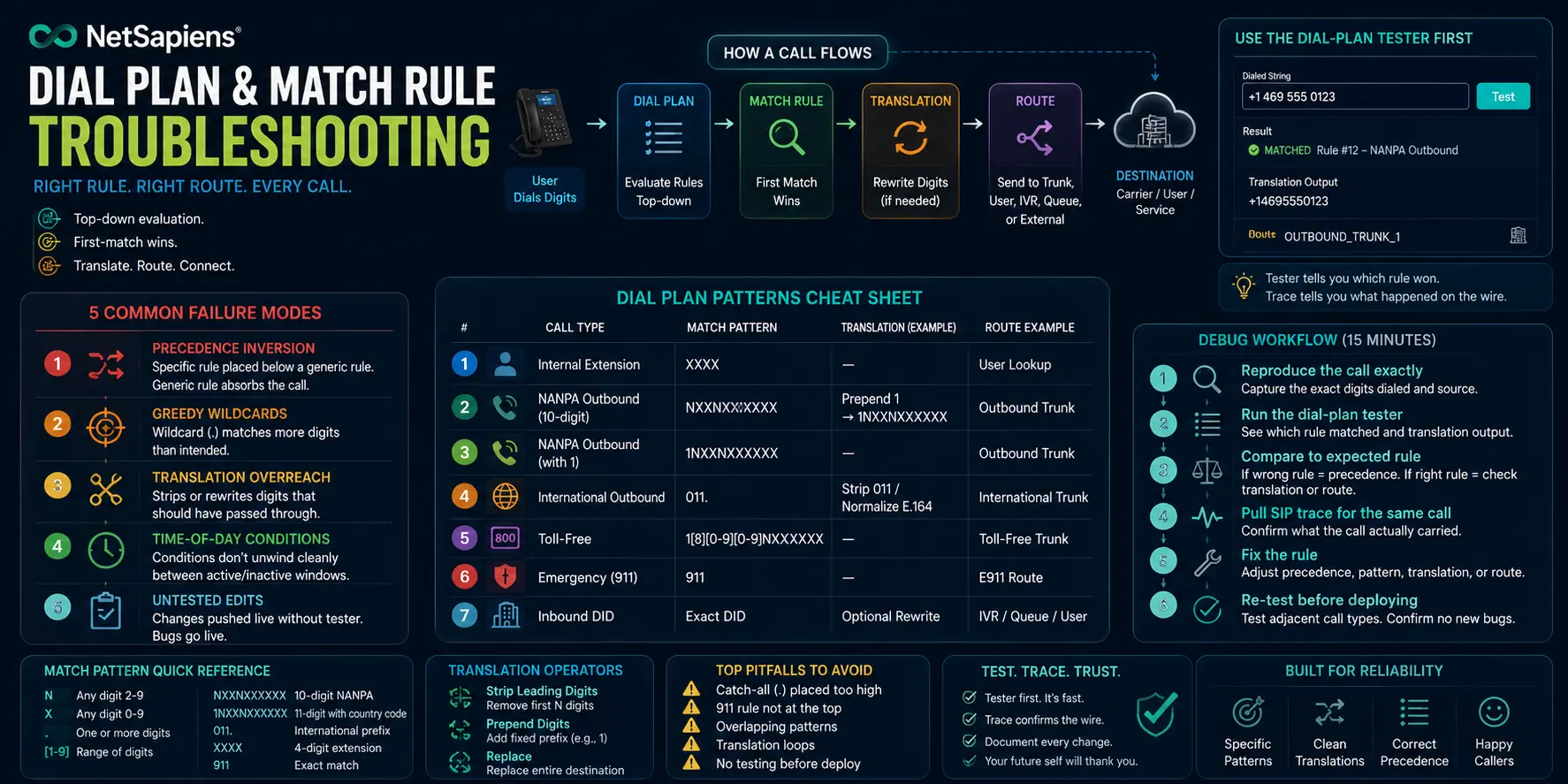
A NetSapiens® dial plan is the easiest part of the platform to demo and the hardest part to keep clean at scale. One translation rule changed last quarter breaks an outbound route for a single tenant, the ticket lands six weeks later, and the engineer who wrote it remembers nothing. This is the playbook for diagnosing dial-plan failures fast — what NetSapiens® is actually doing under the hood, the five failures that account for 90 % of tickets, and the structured debug path that gets you from symptom to fix without guessing.
How NetSapiens® evaluates a dial plan
Every outbound call hits the dial plan in a defined order: most-specific match rule wins, then route translation runs in sequence, then the call is handed to the chosen route group. Most engineers treat the dial plan as a flat list. It is not.
- Match rules are evaluated by specificity, not order. A rule matching
1NXXNXXXXXXbeats one matching1.regardless of which one appears first in the configuration. NetSapiens® compares the match pattern and picks the longest specific match. - Translation runs in order. Once a rule is matched, its translation expressions run top-to-bottom. This is order-sensitive. A digit-strip that should run before a prefix-add will produce the wrong result if reversed.
- Routes are referenced, not evaluated. The chosen route’s
to-uriis what actually gets dialed. If the route group has multiple targets, NetSapiens® picks based on weight, priority, or failover rules — and that decision is invisible from the dial plan alone.
Most “dial plan doesn’t work” tickets are actually one of these three layers failing in isolation, but they look like a single problem from the user’s seat.
The five failures that account for 90 % of tickets
1. No match (the call rings dead)
Symptom: caller hears nothing, call drops, no route selected. SIP trace shows the call entering NetSapiens® and immediately returning a 404 Not Found or 484 Address Incomplete.
Cause: no match rule covers the dialed pattern. Often a tenant inherits a parent dial plan that strips a leading digit assumed to always be present, and a specific use case (e.g., 3-digit short codes) never had its own rule.
Fix: open the dial-plan tester (more on this below), enter the exact dialed string the user typed, and verify whether any rule matches. If none, write one — but resist the urge to add a catch-all . rule, which leads to failure mode #2.
2. Wrong rule wins on specificity
Symptom: call connects but routes to the wrong destination. Often shows up as international calls hitting domestic rates, or emergency numbers routing through the standard outbound carrier.
Cause: a too-broad match rule wins over a more specific one because the specific one was written incorrectly. Example: a rule matching [2-9]11 for emergency calls written as 911 only matches one number, and a catch-all . rule eats 211, 311, 411, 511, etc.
Fix: write match patterns as narrowly as the use case allows. NetSapiens® supports character ranges ([2-9]), exact digit counts (NXXNXXXXXX), and dotted-shorthand. Use the most specific syntax for each rule and reserve . for explicit catch-all behavior at the very end.
3. Infinite translation loop
Symptom: call rings the user back instantly, or shows up looping in CDRs with the same call leg repeating.
Cause: a translation rule outputs something that then matches a different (or the same) rule, which translates again, and again. The classic version is a rule that strips 1 and another rule that adds 1, both matching the intermediate state.
Fix: check the final flag on translation rules. NetSapiens® supports marking a translation as terminal — once it runs, no further matching happens against the result. Use it on any rule whose output could match another rule pattern.
4. Partial translation (right digits, wrong format)
Symptom: outbound carrier rejects the call with 404 Not Found or 503 Service Unavailable. CDR shows the call left NetSapiens®, but the dialed digits don’t match what the carrier expects.
Cause: translation only handled the first stage. E.164 requires + and country code; some carriers accept E.164 strict, others want 1NXXNXXXXXX without the +. The dial plan strips correctly but doesn’t add the prefix the carrier needs.
Fix: read the carrier’s signaling spec, then walk the dial plan one translation at a time matching the carrier’s expected output format. The dial-plan tester shows the post-translation result — compare it character-by-character to the carrier spec.
5. Regex greediness on dotted patterns
Symptom: long-format dialed numbers (international with 11+ digits) hit the wrong rule and either fail or route domestically.
Cause: NetSapiens® dial-plan patterns are not full regex. The dot . matches one or more digits — but a pattern like 1. matches 12, 123, 1234567890123 all the same. A rule meant for North American long-distance (1NXXNXXXXXX) and a rule meant for international (011.) need clear separation, or the wildcard eats both.
Fix: pin the digit count explicitly. Use NXXNXXXXXX for 10-digit, 1NXXNXXXXXX for 11-digit, and 011XXXXXXX. only for true international where the dot is the suffix wildcard.
The dial-plan tester is the most underused tool on the platform
NetSapiens® ships a dial-plan tester in the admin console: enter a dialed string, pick the source endpoint, and the tester shows you which rule matched, the full translation sequence, and the resulting route. Most engineers don’t use it because they jump straight to SIP traces. But the tester answers the question SIP traces can’t: which rule did NetSapiens® think won?
Workflow:
- Take the exact dialed digits the user reported (verbatim — including any leading +, leading 1, or accidental extra digit).
- Open the tester for the relevant tenant.
- Enter the digits, pick the source extension/device.
- Read the matched rule and translation output.
- If the route is wrong, the problem is in match specificity (failure mode #2) or translation order.
- If no rule matches, you’re in failure mode #1.
For everything else — codec mismatches, carrier rejections, post-route failures — the tester confirms the dial plan did its job and the problem is downstream.
When you need the SIP trace alongside the tester
The tester proves what NetSapiens® intends to do. The SIP trace proves what actually happened on the wire. You need both for the failures that survive a clean tester result:
- Tester says route X, SIP trace shows the INVITE going to route Y → check route group weights and failover rules; the dial plan is fine.
- Tester output is correct, but trace shows
484 Address Incomplete→ the receiving SBC isn’t accepting the dialed format; carrier-side issue. - Tester output is correct, trace shows the call connecting, but the user reports a wrong destination → the route’s
to-uriis wrong, or the carrier itself is mis-routing. Pull the carrier’s CDR and compare to yours.
When to escalate to platform engineering
Dial plans on NetSapiens® occasionally hit edge cases that aren’t documented:
- Translation rules behave differently when called from
request-urivsfrom-usermatching — undocumented and version-dependent. - The interaction between tenant-level overrides and reseller-level rules has corner cases where neither one applies.
- Carrier-specific routing tables behave differently for emergency calls than for standard outbound, even when the dial-plan rule is identical.
When the tester output doesn’t match observed behavior, that’s the signal to escalate. Outsourced Tier 1–4 NetSapiens® helpdesk and platform engineering exists for exactly these gaps — engineers who’ve seen the same edge cases across enough tenants to recognize them in 5 minutes instead of 5 hours. For dial-plan changes that touch routing under load, 24/7 NOC monitoring catches the regression patterns — failed-call ratio spikes, route-group failover events — before tickets land. And for tenant-wide platform-level work, our NetSapiens® platform operations service covers the daily admin, change management, and version-tracked dial-plan edits that keep this surface from drifting.
Documentation hygiene is what separates teams that scale
Every dial-plan change should be logged with:
- The triggering ticket or change request.
- The exact pattern added, modified, or removed.
- The tester output proving the change does what was intended.
- The carrier spec or downstream requirement it satisfies.
After six months of that discipline, your dial plan is browseable as a changelog. After two years, it’s the single most valuable artifact on the platform — the institutional memory of every routing decision your customers depend on. Skip this discipline, and every dial-plan ticket starts from zero.
Dial plans are deceptively simple. Get the evaluation order right, write match rules narrowly, use the tester first and the trace second, and document like the engineer six months from now is going to be debugging your work — because they are.