
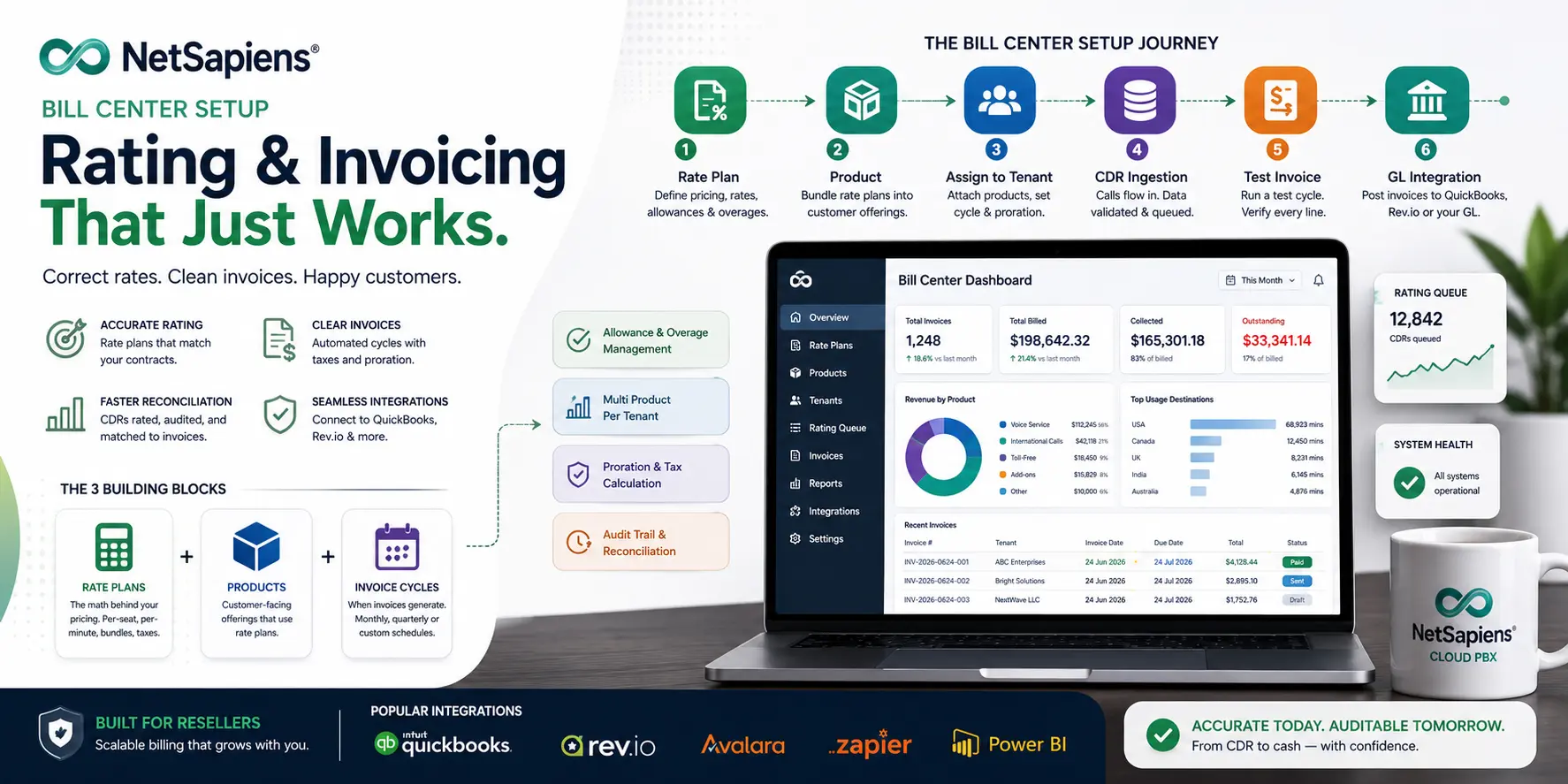
NetSapiens® Bill Center is the rating and invoicing layer of the platform. It prices calls and recurring services against tenant-specific rate plans, generates per-tenant invoices on a scheduled cycle, and (when wired up) feeds those invoices into a general-ledger accounting system like QuickBooks or Rev.io. This guide walks through the setup sequence we use for a new tenant — and the pitfalls that cost resellers real money when the setup is rushed.
If you’re already operating Bill Center and reconciling CDRs against generated invoices, our CDR billing reconciliation guide for NetSapiens® resellers is the companion reference for the operational side. This piece is about the upfront setup.
The three building blocks (in one paragraph)
NetSapiens® Bill Center is built on three concepts that operators have to keep straight: rate plans are the pricing logic (the math); products are the customer-facing offerings that bundle rate plans with a service name; invoice cycles are the scheduled generation of per-tenant invoices using the products attached to that tenant. Build them in that order — rate plan first, then product, then attach product to tenant — and the rest is verification.
Before you start
A clean Bill Center setup needs four things settled before you touch the editor:
- The contract. Per-seat price, included minutes, international rate strategy, add-on charges, billing cycle (monthly / quarterly), payment terms, and proration rule for the first invoice. If any of these are ambiguous, get them clarified before configuration — the most expensive billing bugs are configuration of an ambiguous contract.
- The CDR pipeline. Calls produce CDRs that Bill Center rates. Confirm CDRs are flowing from the tenant before you set up rating; a tenant with broken CDR ingestion produces zero-dollar invoices that look fine until the reconciliation pass weeks later.
- The GL system. QuickBooks, Rev.io, NetSuite — know which one this customer’s revenue is going to be posted into, and which GL account each product maps to. The integration choice influences how you name products and rate plans.
- The taxation strategy. Federal, state, and local telecom tax handling. Bill Center supports tax-table integrations, but the calculation lives in your tax provider (Avalara, CCH SureTax, etc.). Decide where calculation happens before invoices generate.
These four are the inputs to a clean setup. Without them, you’ll re-configure mid-cycle and produce inconsistent invoices.
Phase 1 — Define the rate plan
Rate plans price the things you charge for. A typical reseller rate plan combines:
- Per-seat monthly fees. A flat fee per user or extension.
- Per-minute usage rates. Different rates per destination (NANPA local, NANPA long distance, international by region, toll-free).
- Fixed monthly add-ons. Recording, additional voicemail boxes, premium features.
- Allowance and overage thresholds. Bundled minutes per seat, with per-minute rates above the bundle.
Build the rate plan as a discrete object — separate from the product. Multiple products can reference the same rate plan, and a rate plan can be tweaked centrally rather than per-product.
Common mistakes at this stage:
- Rate-table typos. A misplaced decimal on an international rate produces invoices that look right until a customer makes one international call. Spot-check the math.
- Missing destination categories. If your rate plan doesn’t cover a destination, calls there bill at a default rate (often zero or the wrong tier). Cover the destinations the tenant actually calls.
- Stacking the rate plan with the product. Rate plans are pricing logic; products are offerings. Keep them separate — bundling the two together produces unmaintainable rate plans within 18 months.
Phase 2 — Build the product
Products are what the customer sees. A product has a customer-facing name ("Business Voice — 10 Seats"), a reference to one or more rate plans, and any product-level configuration: recurring vs one-time charges, included allowances, the GL account it posts to.
Build one product per customer-facing offering. Don’t reuse one product for two different priced tiers — that produces invoice confusion downstream.
For multi-product tenants (a customer who has voice service plus separately-billed international calling, for example), build each as its own product attached to the same tenant.
Phase 3 — Assign the product to the tenant
Attach the product to the tenant with the right start date, billing cycle, and proration rule. The first invoice’s accuracy depends on the start date being correct.
For tenants joining mid-cycle, confirm the proration rule against the contract — Bill Center supports several proration models (daily, half-month, full-month) and the wrong choice is a customer-visible billing dispute later.
For tenants migrating in from another platform, set the start date as the day the tenant actually goes live on NetSapiens®, not the contract signing date. Otherwise the first invoice double-charges or undercharges for the cutover period.
Phase 4 — Verify CDR ingestion
CDRs are how Bill Center knows what to rate. Before you generate an invoice, place test calls into and out of the tenant and confirm:
- CDRs land in the rating queue. The platform exposes the queue or rating log — confirm new CDRs arrive within the expected window.
- CDR fields are populated correctly. Originator, destination, duration, codec, route. Missing fields silently corrupt rating.
- Originator identification is right. Per-seat tenants need CDRs identified to the originating user; per-tenant aggregated billing doesn’t, but mixing the two produces surprising invoices.
If CDR ingestion is broken — wrong queue, missing fields, dropped records — every downstream step fails. Fix ingestion before generating an invoice; an invoice generated from corrupted CDR data is hard to retract cleanly.
Phase 5 — Run a test invoice cycle
Before the production billing cycle runs, generate a test invoice for the tenant. Walk through every line item:
- Per-seat charges match the seat count attached to the product.
- Per-minute charges match the rate plan’s destination rates applied to the test call durations.
- Allowances and overages apply correctly — usage below the allowance shows as included, usage above shows as overage at the right rate.
- Taxes and surcharges calculate correctly via the tax integration.
- Proration reflects the start date and cycle.
If any line is wrong, fix the rate plan, product, or tenant assignment — not the invoice. A patched invoice doesn’t fix the underlying configuration; the same bug returns next cycle.
Phase 6 — Wire into the accounting system
The final phase connects Bill Center to the GL system. For QuickBooks Online or Rev.io, this is typically an automated export or API push that posts each generated invoice into the GL with:
- Customer record matching. The Bill Center tenant maps to a QuickBooks customer; confirm the mapping before the first export.
- GL account mapping. Each product line maps to a revenue GL account (voice service revenue vs equipment vs other). Misconfigured mappings show up only on the P&L review.
- A/R increment. The invoice posts to A/R cleanly, with the right due date and terms.
Reconcile the first export manually — every line — before letting the export run unattended. After the first clean cycle, the integration is reliable; before that, it’s a guess.
Common pitfalls
The mistakes that recur across reseller setups:
- Skipping Phase 4. Tenant goes live, calls flow, no one verifies CDR ingestion, first invoice generates with zero usage, customer doesn’t notice until reconciliation. Fix takes the whole next cycle.
- One rate plan per product per tenant. Trying to share rate plans across customers with slightly different pricing produces a rate plan tree that’s unmaintainable inside 12 months. Build per-customer products instead.
- Manual invoice patches. A patched invoice is a configuration bug not fixed. Always fix the underlying configuration; never just edit the invoice.
- Proration mismatches. Mid-cycle activation with the wrong proration rule is the most common first-invoice dispute. Verify the rule against the contract before the first invoice generates.
What we run for resellers
Bill Center setup and ongoing billing operations are part of our outsourced VoIP billing support service for resellers. The setup sequence above is the structure we run for each new tenant onboarding. For the broader operational layer that surrounds it, the NetSapiens® support and operations team holds the rest of the platform steady.
Independence and disclosure
VoIP Support Pro is an independent provider of support and billing-operations services for the NetSapiens® platform. We are not affiliated with, endorsed by, or sponsored by NetSapiens® or Crexendo, Inc. NetSapiens® is a registered trademark of Crexendo, Inc. The Bill Center configuration patterns above reflect our operational practice; vendor-specific tooling and current feature availability remain canonical from the platform owner.