
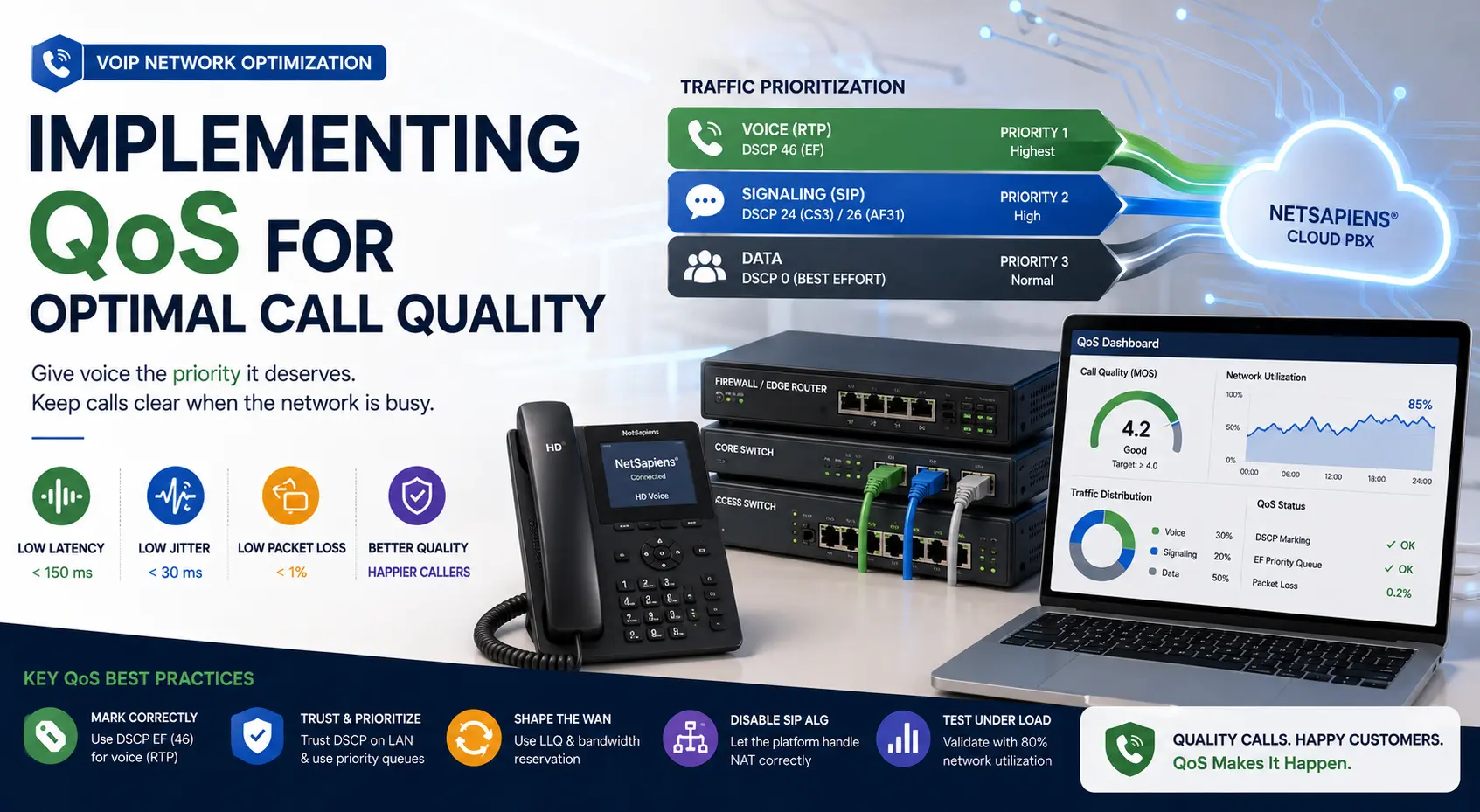
Voice over IP behaves well right up to the moment the network is busy. A backup job kicks off, someone joins a 4K video call, the firewall starts inspecting a large download — and suddenly calls choppy, callers complain, and the platform gets blamed for a network problem.
Quality of Service (QoS) is how you tell every device in the path that voice packets are not optional. Done right, voice stays clear even when the rest of the network is saturated. Done wrong — or skipped entirely — calls degrade the second contention happens.
What “good enough” actually means
Voice traffic is intolerant of three things, in this order:
- Latency: end-to-end one-way under 150 ms. Above 200 ms, conversations feel like a satellite call.
- Jitter: variation in packet arrival times under 30 ms. Higher than that, the jitter buffer can’t smooth it and you hear breakup.
- Packet loss: under 1 %. Anything above and codecs start interpolating — robotic speech, dropped syllables.
These are the budgets you’re protecting. QoS doesn’t make a slow network fast; it makes sure voice gets its budget before anything else takes it.
DSCP marking is the foundation
Every voice packet should be marked with a Differentiated Services Code Point (DSCP) value. The standard:
- EF (Expedited Forwarding, DSCP 46) — voice media (RTP)
- CS3 (DSCP 24) or AF31 (DSCP 26) — voice signaling (SIP)
Phones and softphones should mark these themselves. NetSapiens®-compatible endpoints do it by default — but verify. A Wireshark capture on a tagged voice VLAN will show the DSCP value in the IP header. If you see EF/46 on RTP, you’re set. If you see 0 (best-effort), the phone isn’t marking and nothing downstream can prioritize.
LAN: trust the marking, use the voice queue
On the switch:
- Configure a voice VLAN and assign it to the phone ports (or use LLDP-MED so the phone auto-discovers the VLAN).
- Enable QoS trust on those ports —
mls qos trust dscpon Cisco, equivalent settings on other vendors. This tells the switch to honor the phone’s existing DSCP marking instead of overwriting it. - Ensure the switch has a priority queue mapped to EF traffic. Default templates usually do this, but verify — a switch that “supports QoS” but doesn’t have voice in the priority queue isn’t actually doing anything useful for you.
For untagged data traffic on the same switch, no marking is needed. Best-effort is the correct treatment for everything that isn’t voice.
WAN: where QoS actually earns its keep
The LAN almost never runs out of bandwidth. The WAN does. This is where QoS matters most and is also where it gets skipped most.
- On an MPLS or SD-WAN link, your provider should be honoring DSCP. Confirm in writing — many SD-WAN deployments have policies that re-mark or strip DSCP between sites, which silently breaks end-to-end QoS.
- On a plain internet WAN, QoS only works on the egress side of your edge router. The downstream side (packets arriving from the internet) cannot be prioritized by you — the upstream ISP doesn’t honor your DSCP. Mitigations: oversize the inbound link, use a separate broadband for voice, or move to SD-WAN with a provider that does carrier-side QoS.
- Configure LLQ (Low Latency Queuing) on the WAN-facing interface. A typical policy reserves 30 % of the link for voice (EF), 20 % for signaling and critical apps, and the rest for default traffic. Adjust based on call concurrency.
SIP ALG: turn it off
This isn’t QoS, but it is the most common reason “QoS doesn’t fix the call quality.” SIP ALG on consumer-grade firewalls rewrites SIP packets and breaks NAT traversal, registration, and media paths. Disable it. Every time. If your firewall vendor calls it “SIP helper,” “SIP inspection,” or “SIP fixup” — disable that too. The platform handles NAT correctly without help.
Codec choice changes the math
QoS reserves bandwidth, but codec choice determines how much voice traffic you generate in the first place.
- G.711 (PCMU/PCMA): 64 kbps payload, ~85 kbps with overhead. Uncompressed, best quality, highest bandwidth.
- G.722: wideband HD audio, same ~85 kbps as G.711. Default for on-net calls when both endpoints support it — and they should.
- G.729: ~8 kbps payload, ~30 kbps with overhead. Compressed, smaller, slightly lower quality. Useful on capacity-constrained links.
- Opus: variable bitrate, adapts to network conditions. Increasingly the default on softphones.
For most NetSapiens® deployments, allow G.722 and G.711 on-net, fall back to G.729 only on the WAN side if bandwidth is genuinely constrained. Don’t blanket-force G.729 — the bandwidth savings rarely justify the audio quality drop in 2025.
Test it, then test it under load
A clean test on an idle network proves nothing. The validation that matters:
- Idle network MOS score: ≥ 4.0. Tools like PRTG, SolarWinds VNQM, or NetSapiens®’ built-in call analytics report this.
- Loaded network MOS score: ≥ 3.8 with the WAN at 80 % capacity from non-voice traffic. If it stays above 3.8, QoS is working. If it drops below 3.5, something in the path is not honoring DSCP.
- Re-test quarterly. ISP route changes, firmware updates, and config drift all break QoS silently. The test that proved it worked six months ago does not prove it works today.
When to escalate
Persistent voice quality issues that survive a correct QoS configuration usually mean something is wrong further upstream — carrier routing, peering, or a NetSapiens®-side codec negotiation. That’s where a Tier 4 platform engineer earns their keep: pcap analysis, SDP comparison, and direct platform-side adjustments. If you’re spending more than a few hours a quarter chasing call quality, that’s exactly the operational pattern outsourced Tier 1–4 white-label VoIP support is designed to absorb — and if call-quality regressions are happening across multiple tenants, 24/7 NOC monitoring with MOS-per-route tracking detects the degradation before tickets land.
QoS is unglamorous work, but it’s the work that makes the difference between a VoIP system people love and one people quietly resent. Get the markings right end to end, prove it under load, and the rest of the platform can do its job.