
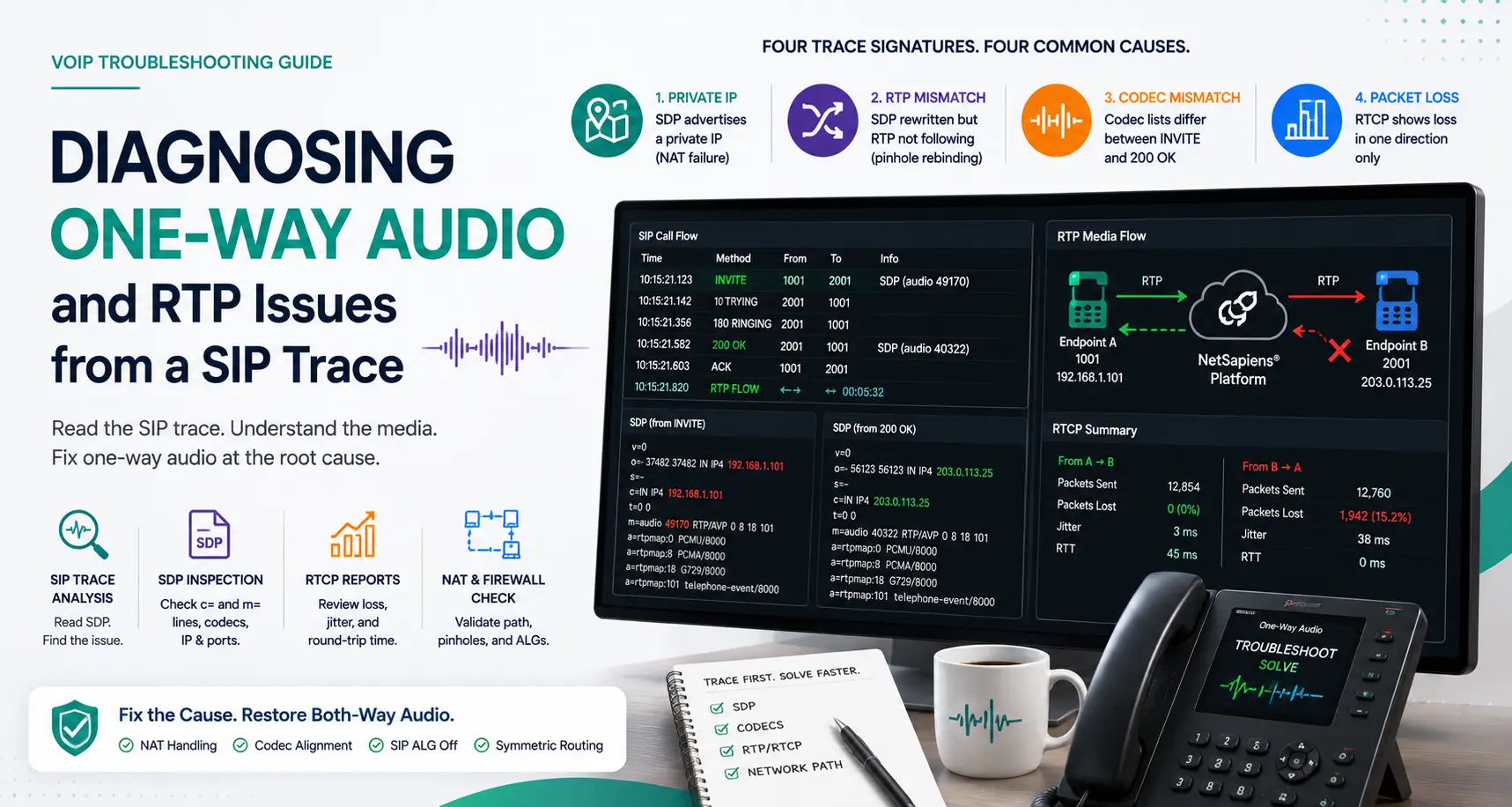
One-way audio is the ticket that wastes engineering hours faster than any other. The user hears the caller, the caller can’t hear them — or the reverse. Both sides confirm “the call connects, but it’s broken.” The instinct is to start blaming the phone, the firewall, or the network. The discipline is to pull the SIP trace first, because the trace tells you exactly which direction the media is failing and why. This is the structured way to read a NetSapiens® SIP trace when audio isn’t flowing.
The trace has three things you need
A NetSapiens® SIP trace, pulled from the call detail records or live capture, contains every SIP message exchanged between the SBC, the platform, and the endpoint. For diagnosing one-way audio, three things matter:
- The SDP body in the INVITE and the 200 OK. SDP advertises which IP and port each side wants RTP delivered to, plus the codec list.
- Any re-INVITEs or UPDATE messages. These rewrite the media negotiation mid-call, and they’re how mid-call audio failures happen.
- The RTCP messages, if RTCP is enabled. RTCP carries packet loss, jitter, and round-trip-time data that quantifies how bad the media is when it does flow.
If your platform’s trace tool shows only signaling and skips SDP, switch to a deeper capture mode. SDP is non-negotiable.
The four trace signatures of one-way audio
Signature 1: SDP advertises a NAT address (RFC 1918)
Look for the c= line in the SDP body of the INVITE:
c=IN IP4 192.168.x.xA private IP in the SDP means the endpoint announced its LAN address as the destination for media. RTP packets routed to 192.168.x.x from the public internet will never arrive. This is the classic NAT failure mode.
Cause: the endpoint doesn’t know its public IP, no STUN or platform-side NAT detection is in play, and the platform’s media relay isn’t enforcing far-end NAT traversal.
Fix: enable far-end NAT detection on the NetSapiens® platform (rport, latching, or media relay depending on platform version). On the endpoint, enable STUN with a reachable STUN server. If you control the firewall, disable SIP ALG — most of the time SIP ALG is what corrupts the SDP rewrite in the first place.
Signature 2: SDP rewritten in the trace but RTP not following
The SDP shows a public IP — looks healthy — but the user still has one-way audio. Run the trace through a SIP capture tool that shows the SBC’s media relay binding. If the SBC is bound to a public IP but the RTP source port from the endpoint never matches, the SBC isn’t sending RTP back to where the endpoint is actually listening.
Cause: NAT pinhole rebinding. The endpoint sent INVITE from source port X. The SBC bound to that. Between INVITE and the start of RTP, the firewall rebound the pinhole to port Y. The SBC keeps sending to X. Endpoint hears silence.
Fix: NAT keepalive on the endpoint at <30 second interval. NetSapiens®-compatible IP phones support keepalive natively (Polycom, Yealink, Cisco). Softphones may need explicit configuration.
Signature 3: Asymmetric codec negotiation
INVITE SDP offers G.711, G.722, and G.729. 200 OK answers with G.722 only. Endpoint encodes G.722 but the receiving side decodes G.711 — because somewhere upstream a codec is being forced or the negotiation is being rewritten by an SBC or media gateway.
Symptom on the wire: RTP packets flow in both directions but decode as silence or static on one side.
Fix: walk the SDP from INVITE through every 1xx provisional, the 200 OK, and any re-INVITE. If the codec list changes anywhere it shouldn’t, find the intermediary that’s rewriting. Common culprit: a SIP ALG, a transcoding media gateway, or an SBC with media-bypass disabled.
Signature 4: RTCP reports show loss only in one direction
If RTCP is enabled and the trace includes RTCP messages, you’ll see Sender Reports and Receiver Reports for both directions of the call. If one direction reports 0 % loss and the other reports 60 %+ loss, you have asymmetric routing.
Cause: usually an upstream firewall or NAT device that’s letting outbound RTP through but blocking inbound (or vice versa). Sometimes a routing asymmetry where outbound goes through one ISP and inbound through another, and one path silently drops UDP traffic.
Fix: traceroute from the affected endpoint to the platform’s media address in both directions. Look for asymmetric paths. If both paths look symmetric but loss only happens one way, you’re looking at a firewall, not a network.
Reading the SDP: a worked example
Here’s a real-looking SDP from a NetSapiens® trace:
v=0
o=- xxxxxxxxxx xxxxxxxxxx IN IP4 xxx.xxx.xxx.xxx
s=-
c=IN IP4 xxx.xxx.xxx.xxx
t=0 0
m=audio 18500 RTP/AVP 9 0 8 101
a=rtpmap:9 G722/8000
a=rtpmap:0 PCMU/8000
a=rtpmap:8 PCMA/8000
a=rtpmap:101 telephone-event/8000
a=fmtp:101 0-15
a=sendrecv
a=ptime:20
Key reads:
c=IN IP4 xxx.xxx.xxx.xxx— endpoint announces a public IP. Good, no NAT failure here.m=audio 18500 RTP/AVP 9 0 8 101— UDP port 18500 for RTP; codec list ordered G722, PCMU, PCMA.a=sendrecv— endpoint wants both directions of media.
Compare to the 200 OK SDP. If the 200 OK has a=recvonly instead of sendrecv, the answering side has explicitly said “don’t send me audio.” If a=inactive, neither direction will flow until a re-INVITE fixes it. Both are common in early-call hold scenarios that didn’t unwind correctly.
Quick decision tree
| Trace observation | Likely cause | First fix |
|---|---|---|
c= line is RFC 1918 IP | Endpoint NAT not handled | Enable far-end NAT, disable SIP ALG |
c= is public, RTP one-way | NAT pinhole rebinding | NAT keepalive <30s on endpoint |
| Codec list changes between INVITE and 200 OK | Intermediary rewriting SDP | Find and disable SDP-aware intermediary |
| RTCP loss in one direction only | Asymmetric routing/firewall | Traceroute both directions, find dropper |
SDP has a=recvonly or a=inactive | Hold/transfer scenario didn’t unwind | Force re-INVITE with sendrecv |
When the trace shows nothing useful
Occasionally, the SIP trace is clean — SDP is correct, codecs match, no NAT issues — and audio is still one-way. The trace can’t see what’s happening at the media layer if RTP is going somewhere the platform never receives. At that point you need a pcap from the endpoint side, captured with Wireshark or tcpdump, filtered to the UDP port the SDP advertised. The pcap shows whether RTP is leaving the endpoint at all.
If RTP isn’t leaving the endpoint, it’s a client-side mute, codec failure, or audio-stack problem — restart the phone, update firmware, swap headset, work the endpoint.
If RTP is leaving but not arriving at the platform’s media address, it’s network — firewall, NAT, routing. Work the network.
That branch closes the diagnosis.
When to escalate
If you’re three hours into a one-way audio ticket without a clean answer, escalate. The diagnostic depth needed for the residual 5 % of cases — codec transcoding chains, regional SBC failover during a media renegotiation, BYOC carrier media-path quirks — is Tier 4 work, not Tier 1. Our white-label Tier 1–4 NetSapiens® helpdesk is built for these escalations: engineers who’ve seen the same SDP patterns across hundreds of tenants and recognize the signature in minutes. For ongoing media-quality monitoring, 24/7 NOC monitoring with per-route MOS tracking catches one-way audio patterns across tenants before the tickets even land.
What a clean trace culture looks like
Every one-way audio ticket should resolve with a documented root cause and the trace excerpt that proved it. After 30 tickets, you have a runbook keyed by trace signature — engineers recognize the pattern in seconds instead of hours. The teams that scale aren’t smarter; they just have better documented failure libraries. The trace is the source of truth. Read it first, fix what it tells you, and document the fix where the next engineer can find it.