
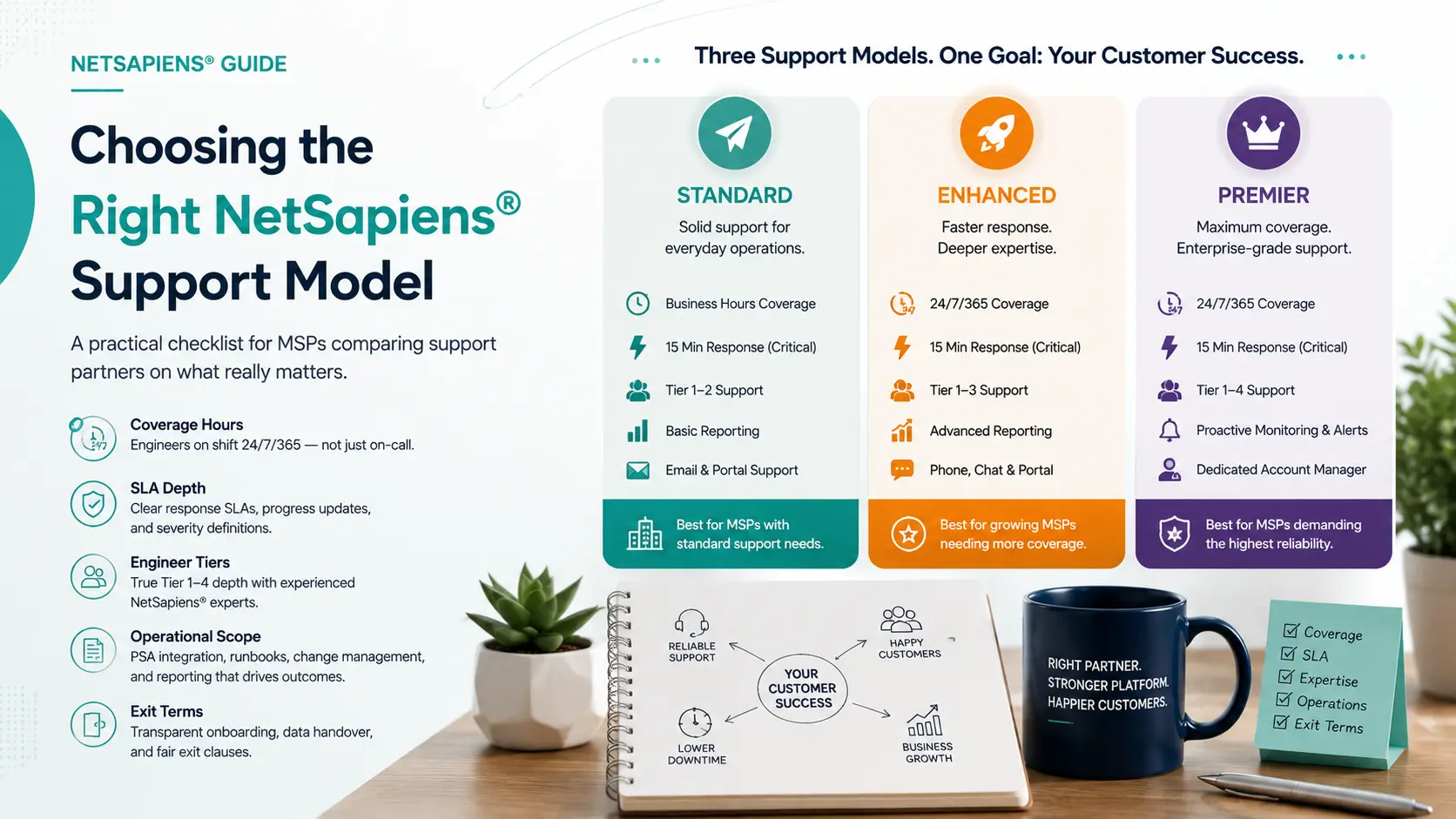
Picking a NetSapiens® support partner sounds like a vendor-selection exercise. It isn’t. You’re picking the team your customers will quietly experience as you — every ticket, every escalation, every late-night incident. Get it right and your support stops being a constraint on growth. Get it wrong and you spend the next year explaining why your service feels different from what they signed up for.
This is the checklist that separates the partners worth talking to from the ones that look good on a website.
Coverage hours — what the words actually mean
“24/7 support” appears on every VoIP support partner’s site. Read past the headline.
- What hours are engineers actually on shift? “24/7 monitoring” with on-call paging is not the same as engineers at a workstation. Ask for the shift schedule. If the answer involves “we page someone,” the response time will reflect that.
- What happens on weekends and holidays? Some partners maintain full coverage 365 days a year. Others throttle to skeleton crews. For an MSP with retail or hospitality customers, weekend coverage isn’t optional — that’s when the calls actually happen.
- Are weekend engineers Tier 1 only? A common pattern: weekdays have Tier 1–4 coverage, weekends have Tier 1 with escalation paths. Know which one you’re buying.
SLA: response vs. resolution
These are not the same number, and partners that conflate them are signaling something about their operations.
- Response SLA: how fast a human acknowledges the ticket. A 15-minute response SLA on critical incidents is a serious commitment; 30 minutes is reasonable; 1 hour is a generalist outsourcer.
- Resolution SLA: how fast the issue is actually fixed. Almost no partner will commit to a hard resolution SLA because too many variables sit outside their control (carrier, customer-side network). But they should be willing to commit to progress reporting SLAs — every 30 minutes on a Sev 1, every 2 hours on Sev 2.
- Severity definitions. Get the severity matrix in writing. “Critical” should be platform-down or major service-affecting. If a partner’s definition of critical is too narrow, your real incidents will be classified Sev 3 and treated like a password reset.
Engineer depth: Tier 1 to Tier 4
NetSapiens®-specific issues escalate fast. The partner needs depth at every tier.
- Tier 1 — password resets, basic phone troubleshooting, voicemail issues. Should resolve 60–70 % of tickets without escalation.
- Tier 2 — dial-plan changes, hunt-group adjustments, basic provisioning. Should resolve another 20 %.
- Tier 3 — codec issues, SIP trace analysis, complex routing. Roughly 8 %.
- Tier 4 — platform-side engineering, carrier coordination, multi-tenant configuration. The last 2 % — but they’re the calls that decide whether your platform is reliable.
Ask: how many Tier 4 engineers are on the bench? If the answer is one or two, you’re one resignation away from a coverage gap. If they can’t quantify the bench depth, they probably don’t have one.
Operational scope — what they touch beyond tickets
A serious partner runs operations, not a queue.
- PSA integration. They should work inside your ticketing system, not theirs. ConnectWise, Autotask, Halo, Freshservice — the integration matters because it determines whether you have visibility or just a black box.
- Runbooks and documentation. Ask for a sample of how they document a complex incident. If it’s a paragraph, that’s a paragraph-quality team. If it’s a structured runbook with reproducible steps, that’s a process-driven team.
- Change management. Every dial-plan change, every platform-side configuration update, should be logged with who, what, when, and why. The audit trail isn’t optional.
- Reporting cadence. You should be getting monthly reports — ticket volume, resolution times, escalation rates, recurring issues — without asking. If you’re chasing the partner for the report, the report isn’t a real artifact.
10DLC and compliance competence
This is where most partners are quietly weak. (For the operational shape of what good looks like here, see our 10DLC registration and compliance service — brand registration, vetting, and ongoing campaign monitoring as a single workflow.)
- TCR registration and brand vetting. Your messaging-enabled customers need this. Does the partner handle it as part of onboarding, or do they punt to you?
- Campaign management. Use case vetting, opt-in/opt-out flows, consent records. Compliance failures here mean customer messaging stops working with no warning.
- Carrier registry experience. Each carrier has quirks. A partner that’s only registered campaigns with one or two carriers will hit unknown territory when your customer’s traffic goes through a third.
If you’re not sure how strong they are here, ask for a redacted example of a campaign vetting they handled — what was rejected, what was the fix, how long did it take.
Onboarding and exit clauses
Two questions that surface real character:
- How long is onboarding? A serious partner can be operational inside your stack in 1–2 weeks. If onboarding takes a month, the friction is going to show up everywhere.
- What’s the exit clause? Read it before you sign. If exiting requires 90+ days of notice or fees, that’s the partner protecting themselves from you walking. Reasonable terms: 30-day notice, full data handover, no penalty.
Pricing models — what they’re actually charging for
- Per-seat: simple, scales linearly. Works well for stable customer bases.
- Per-ticket: misaligned incentives — they make more money when your customers have more problems.
- Flat retainer: predictable, covers a defined scope. Best for MSPs with mixed ticket volume.
- Tiered packages: “Bronze/Silver/Gold” with different SLA levels. Watch for what’s excluded in the lower tiers — it’s usually the things you actually need.
Ask what an “average customer” looks like in their book, then compare to your profile. If you don’t match, the pricing model wasn’t built for you.
The questions partners answer in writing
Before any contract, ask these five questions and require written answers:
- What is the response SLA on a critical incident, and what triggers credit if you miss it?
- How many Tier 4 NetSapiens® engineers do you have, and how is on-call rotated?
- Show me a redacted runbook for a complex incident.
- What is the exit clause, and how is data handed back?
- Who is the named account manager, and what is their direct contact?
The answers to those five questions tell you almost everything that matters.
What “right” looks like
The right partner is one where your customers stop noticing your support exists — because it just works. No surprises on the invoice, no surprises on the SLA, no surprises on what they will or won’t touch. The partnership is boring, predictable, and your churn drops because the customer experience is consistent.
That outcome takes a partner that runs operations like an engineering team, not a call center. They’re harder to find than the ones with the loudest marketing — but they’re the ones that age well.
If you’re evaluating partners, our white-label VoIP helpdesk and Tier 1–4 NetSapiens® support is built around the principles in this checklist: 15-minute critical SLA, engineers on shift 24/7/365, PSA integration, and operations run as documented runbooks rather than ad-hoc handling. If you’re consolidating customers onto NetSapiens® from another platform, our VoIP platform migration service handles the cutover with explicit rollback gates so a botched migration doesn’t burn customer trust.